Find Downloaded Photos on iPhone, Android, Mac and Windows

Instructions1 min read
Mikko Haapanen

Mikko Haapanen

Founder & Developer

Find Downloaded Photos on iPhone, Android, Mac and Windows

Accessing your saved files can be different depending on your device, browser and settings. Here’s a quick guide to help you find your downloads across various platforms.

Mobile devices

iOS (iPhone/iPad)

Safari

Downloads are shown in Safari address bar. Downloaded files can also be accessed in the Files app.
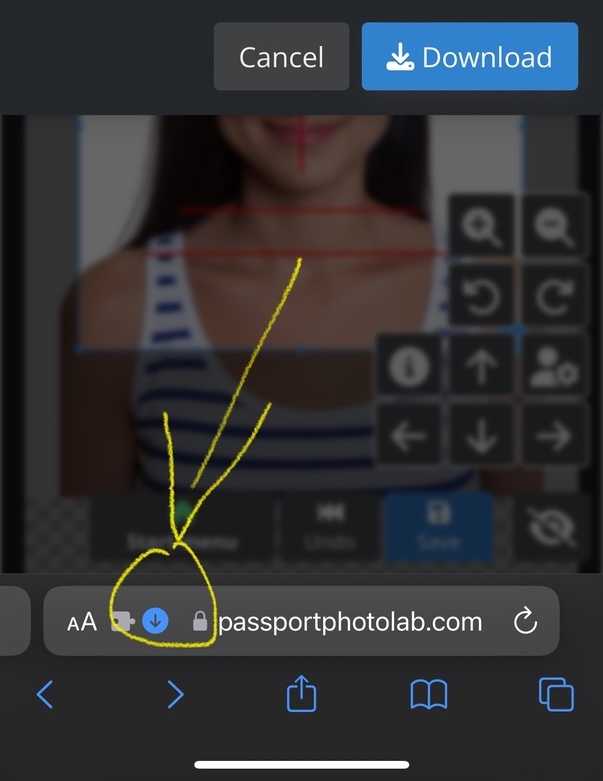
iOS Safari download instructions

Learn more

Android

Chrome

Open the Files app and tap on Downloads.

Learn more

Desktop/Laptop computers

Windows

Chrome

Click the three dots menu, then Downloads.

Learn more

Edge

Click the three dots menu, then Downloads.

Learn more

macOS

Chrome

Click the three dots menu, then Downloads.

Learn more

Safari

Click the Downloads button in the toolbar.

Learn more

Read next

How to Take Passport Photos at Home (2026)
27 min read
Guides
Save money and get better results by taking your passport photos at home. In this guide, you’ll learn exactly how to take passport, visa, or ID photos at home without any studio equipment. While you likely know the basics—neutral expression, facing…
Mikko Haapanen

Mikko Haapanen

Founder & Developer

Print Passport Photos at Correct Size
3 min read
Instructions
How to print your photo at the correct physical size. Instructions for home printers and photo printing services.
Mikko Haapanen

Mikko Haapanen

Founder & Developer

How to Look Good in Passport Photos: 12 Professional Tips (3-Minute Guide)
10 min read
Tips
Are you tired of unflattering passport photos? You’re not alone. Like many others, I struggled with how I looked in my passport photos until I discovered these professional techniques. Drawing on the expertise of industry-leading photographers, I’ve…
Mikko Haapanen

Mikko Haapanen

Founder & Developer